Dimensions
General
Dimensions are values that categorize entries so you can track and analyze them on documents, such as TMS-, WMS-orders, Trips etc. The use of dimensions is consistent with the use of a cost/profit center structure in financial accounting. Dimensions are also very powerful for analyzing in business intelligence.
Structure dimension values and 3PL documents
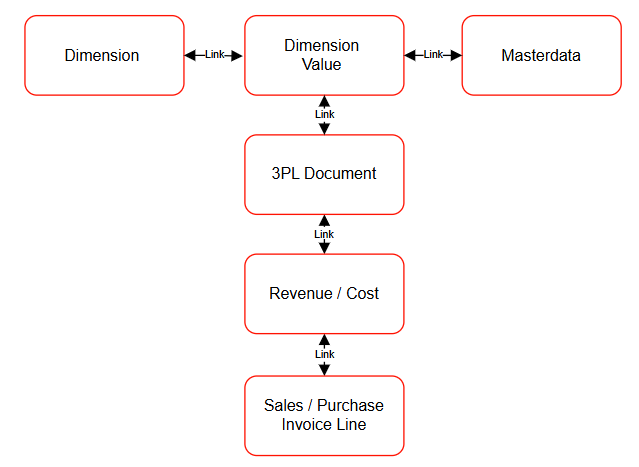 The above structure shows how dimensions and Dimension Values can be linked to Masterdata like Departments, Plandepartments, Customers or Resources. The Dimension and Dimension Values can automatically be linked to 3PL-Documents like FMS Orders, WMS-orders, TMS Orders, TMS-Sections, TMS-Trips, ect. This can be achieved by applying function
When a Dimension and Dimension Values have been linked to an 3PL-Document the Dimension and Dimension Values will automatically be linked to the Revenues and Costs related to the 3PL Document. Once Revenues and Costs have been invoiced the dimension and Dimension Values will also be linked to the invoice lines of Sales- and Purchase Invoice.
The above structure shows how dimensions and Dimension Values can be linked to Masterdata like Departments, Plandepartments, Customers or Resources. The Dimension and Dimension Values can automatically be linked to 3PL-Documents like FMS Orders, WMS-orders, TMS Orders, TMS-Sections, TMS-Trips, ect. This can be achieved by applying function
When a Dimension and Dimension Values have been linked to an 3PL-Document the Dimension and Dimension Values will automatically be linked to the Revenues and Costs related to the 3PL Document. Once Revenues and Costs have been invoiced the dimension and Dimension Values will also be linked to the invoice lines of Sales- and Purchase Invoice.
Tip
For more information on dimensions visit Microsoft Learn. The following status-functions can be applied in the Status Template of TMS-document to add Dimensions and Dimension Values to a document header or revenues.
- Status Function 11172845-101 for adding resource dimensions and Dimension Values to revenues.
- Status Function 11172845-346 for adding TMS document field-value from as a Dimension Values to the TMS document Header.
Functionality
Actions
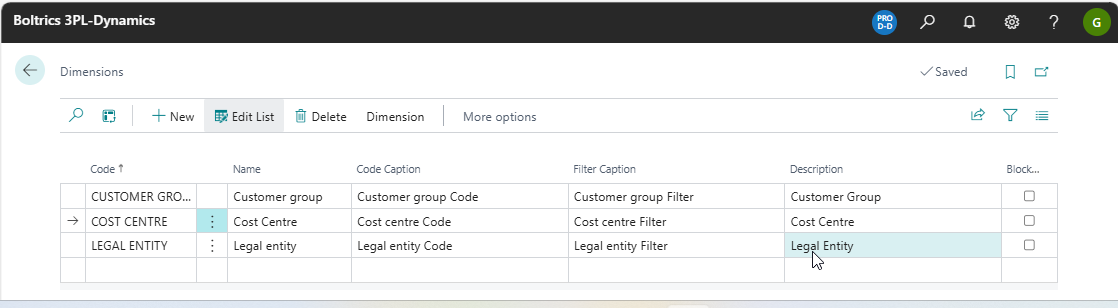
New: Adds a new record above the selected Dimension.Edit List: Changes to edit-modus.Delete: Deletes the selected Dimension.DimensionOpens the menu Dimension.Dimension Values: Opens the page: Dimension Values which contains the values applicable on the selected Dimension.Account Type Default Dimension: Opens the page: Account Type Default Dimension on which the default Dimension and value applicable per table can be set.Allowed Dimensions per Account: Opens the page: Allowed Dimensions per Account on which the allowed Dimension per account can be set.Translations: Opens the page: *Dimension Translations" to set up the translations.
ActionsMap to IC Dim with Same Code: -
Fields
Code: The unique code of the Dimension.Name: The name of the Dimension.Code Caption: The value to be displayed as the title of fields/columns for the Dimension.Filter Caption: The value to be displayed when the Dimension is applied as a filter.Description: The description of the Dimension.Blocked: Specifies that the *Dimension is blocked from being posted in financial Transactions.