Boltrics Contact List
General
Within the customer environment, a central contact list is available containing all registered contacts of the organization. From this list, users can submit requests to add, modify, or remove contacts. These requests are handled via a support ticket that is automatically created.
Functionality
To make changes to the contact list, create a Contact Update Request by following following steps:
Note
- Adding new contacts or modifications on contacts will automatically generated a support ticket so the Boltrics support team can process the request according to the standard procedure.
- Submitted requests can be reviewed under: Contact update requests.
1.Boltrics contact list.
Click on the search-action:  and type: Boltrics Contact List to find the page.
2. Start a request.
Click on the action: Create contact update request to start a request.
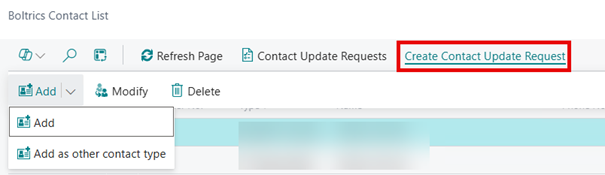
| Action | Description |
|---|---|
| Add | This option will add a new user in the contact list |
| Add as other contact type | This option will add an other contact type to the contact. E.g. adding update-contact so a key-user will be informed of updates |
| Modify | To change a Phonenumber or e-mailaddress of the contact |
| Delete | To delete the contact entirely or to remove a contact type from the contact |
3. Add new contact
The action: Add will open the following page to register the information of a completely new user.
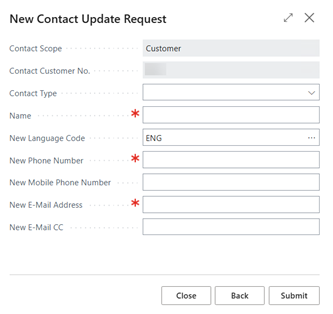
Fill in the required fields: contact type, name, e-mail address, phone number and language code and submit your request.
4. Add other contact type
Select the required contact in the contact list en click on the action: Add other contact type. This will open a selectionpage to add a new contact type for the contact. E.g., adding a key user as an update contact. Click on submit to confirm the request.
5. Modifying
Select the option: Modify to edit existing details such as email address or phone number. After changing submit your request.
6. Deleting
Select the option: Delete to remove a contact from the contact list entirely or to remove a contact type from the contact.
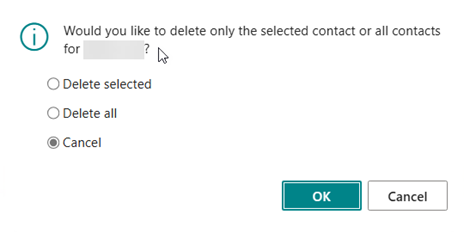
| Option | Description |
|---|---|
| Delete selected | Only the selected contact type will be deleted |
| Delete all | The entire contact will be deleted, including all contact types for the selected contact |
| Cancel | To return to the contact list page |