Periodic Template(s)
When posting a sales- or purchase invoice from out WMS/TMS, the lines of the invoice are created from WMS/TMS document, wich has it's own posting date. Mostly, invoices are created afterwards, probably on a later posting/document date. The posting date for customer- and vendor ledger entries, mostly as wel as VAT ledger entries, AND the calculation of payment terms is determined from this invoice posting- or document date. But the actual revenue and cost posting should be in WMS/TMS posting date ; when service is provided. This can be configured using periodic template(s)
Configuration
3PL Warehouse setup
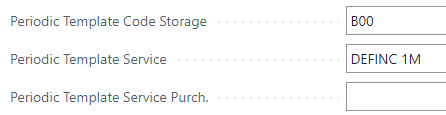
Several periodic templates can be created, in order for proper use in automatic posting from WMS/TMS invoices, at least 2 are needed In 3PL Warehouse setup ; fasttab general ; periodic template "B00" can be used for Storage ("B00" is hard coded in storage invoicing software), and a random one for service/purchase lines.
Periodic template setup
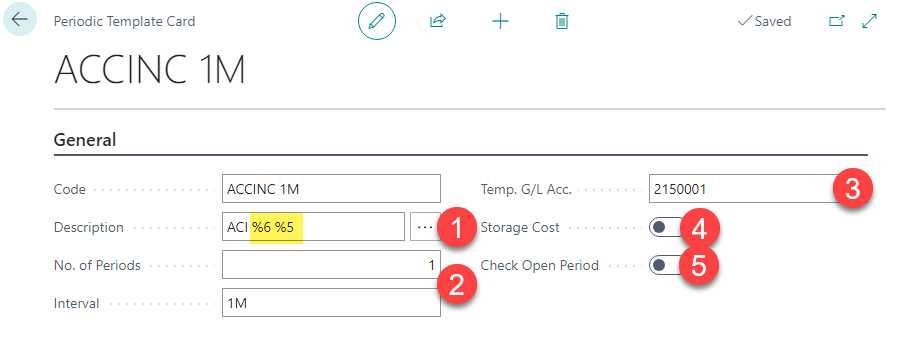
1- Description
% code refers to pre-defined desctription functions using descriptions from WMS/TMS line and/or accounting periods.
2- No. of periods and interval
are set to be 1 and 1D /W/M when used in automatic posting, configured in 3PL Warehouse setup. For storage 1D is advised as for each day storage can be calculated en posted in correct storage period in case of 'split/broken week' Using more then 1 period, the template can be used to spread the line amount over multiple periods, using periodic starting date as calculation start date.
3- G/L account
This is the balance account for each periodic posting to divert the line amount to WMS/TMS posting date.
4- Storage cost
When set as a storage cost periodic template in 3PL Warehouse setup.
5- Check open period
This is a feature than enables to post without date error when WMS/TMS posting date (periodic starting date) is not valid anymore. (checks General Ledger Setup "posting allowed") - if not valid, periodic starting date- and template are ignored and invoice posting date will be used.
Walkthrough
When periodic template is configured, TMS/WMS posting date from service line is copied to "periodic starting date" in invoice line. At posting, extra posting lines from and to balance account are added in order to divert the amount to this WMS/TMS posting date.