DataHub Transactions
You can open the Flow Run List of a specific Flow by clicking the number of Transactions in the DataHub Flow List.
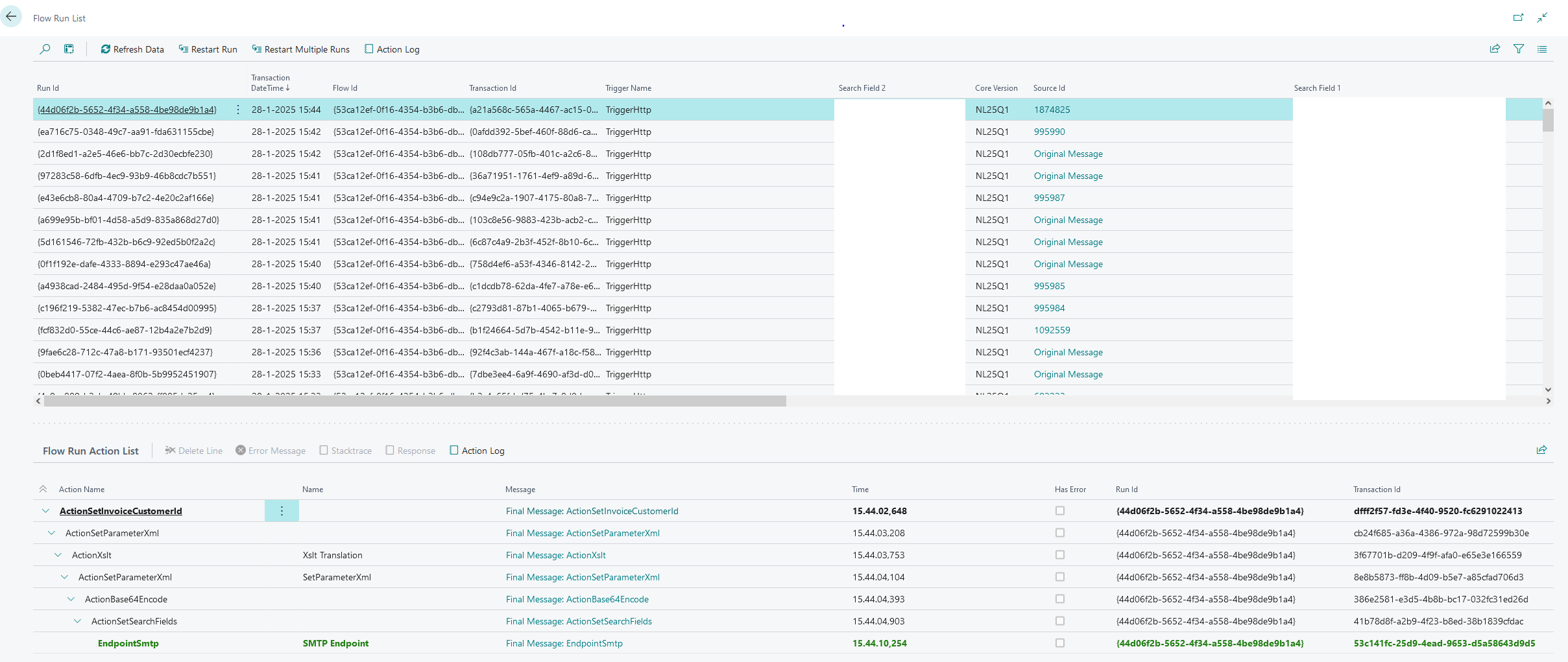
Flow Run List Page Overview
This page offers a clear snapshot of every Flow execution in the system:
Top Section (Runs Overview)
This is a list of all Transactions that have gone over this Flow
- Run ID – A unique identifier for that run.
- Transaction Date/Time – When the Flow was triggered or executed.
- Flow ID – Which Flow definition was run.
- Transaction ID – The transaction associated with this Flow run.
- Trigger Name – The mechanism (HTTP, SFTP, etc.) that started the Flow.
- Search Fields – Custom values (such as customer references or codes) to help identify or filter runs.
Bottom Section (Flow Run Action List)
This is a list of all Actions that are executed for the selected Run.
- Action Name & Message – Which step was performed (e.g., XSLT, SetParameter, SMTP Endpoint) and the resulting message.
- Time – The exact timestamp of that action.
- Has Error – Indicates if the action encountered an error.
- Run ID / Transaction ID – Links each action back to the specific run and transaction for easy traceability.
By examining both the overall Runs at the top and the Action List at the bottom, you can trace each Flow’s path from start to finish—understanding what triggered the run, which steps were taken, and whether any issues occurred along the way.