Workflow Tickets
General
When reporting a ticket at the support-department of Boltrics the following workflow is applicable.
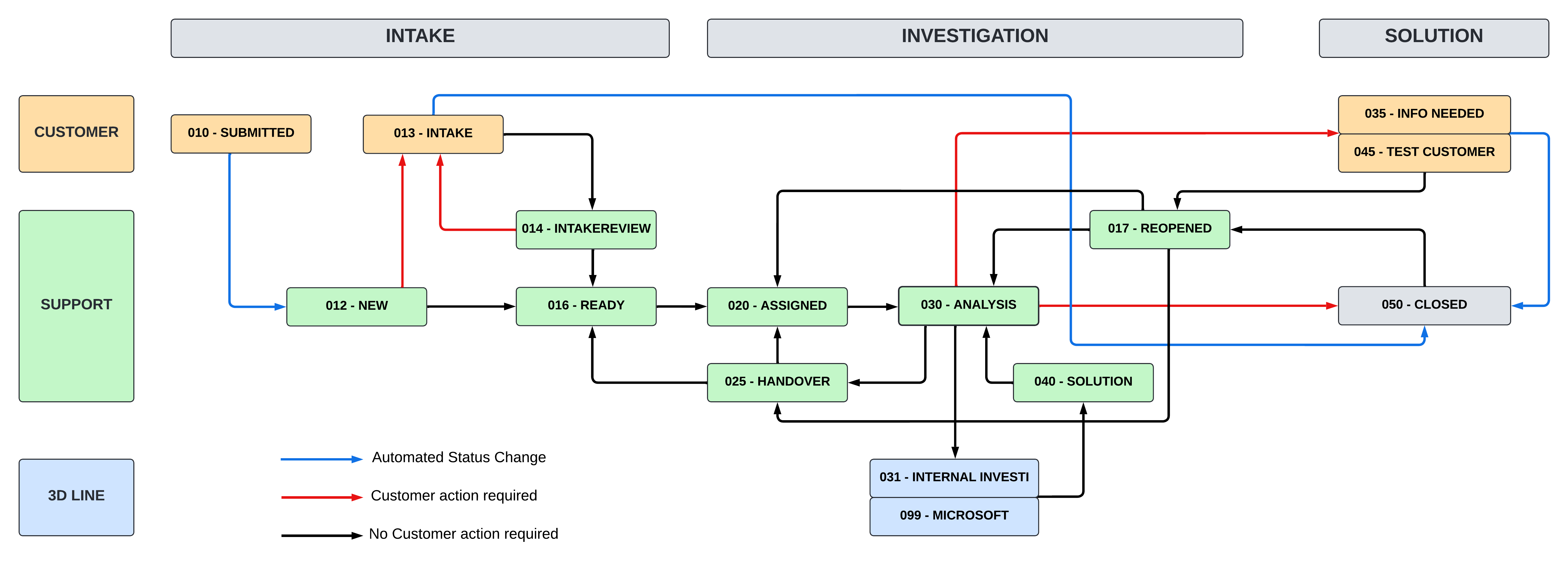
Statuses
005-WIZARD Wizard in progress
The Support ticket is being created using the wizard.
010-SUBMITTED Submitted
The ticket has been successfully created, and the wizard steps are completed. A task queue automatically transitions the ticket to status: 012-NEW, and a confirmation email is sent automatically to the customer.
012-NEW New
The Boltrics support team has received the ticket. An initial review is conducted to verify that all necessary information is provided and that the request falls within the scope of support. If these criteria are met, the ticket moves to Status: 016 - Queued assignment to a support consultant.
013-INTAKE Intake
The initial review has identified missing or unclear information in the ticket. Further details are required from the customer before the ticket can proceed. The customer is notified of the additional information needed.
014-INTAKEREVIEW Intake Review
The support team reviews the additional information provided by the customer. Based on this review, the ticket is either moved to Status: 016 - Queued or returned to Status: 013 - INTAKE if further clarification is still required.
016-QUEUED Queued for Assignment
The ticket has successfully passed the intake process and is now queued for assignment to a Support Consultant. Tickets are generally handled on a First In, First Out (FIFO) basis. Exceptions may apply to urgent or business-critical issues, as assessed by Boltrics Support.
017-REOPENED New reply from customer
The customer has either responded to a previous inquiry, approved the proposed solution, or reopened a closed ticket.
020-ASSIGNED Assigned to resource
The ticket has been assigned to a support consultant for further investigation.
025-HANDOVER Handover
The assigned consultant is unable to continue handling the ticket and has requested to transfer the case to another colleague for further assistance.
030-ANALYSIS Problem analysis
The ticket is under investigation, and work is ongoing to identify and resolve the issue
031-INTERNAL INVESTI Internal investigation
The ticket has been escalated internally to the 3rd Line team, which may include Development, Data Integration, or ITOPS.
035 – INFO NEEDED Information Needed
Further action is required from the customer: Additional information or a response is required from the customer before proceeding.
040-SOLUTION Implement solution
A proposed solution from the 3rd Line team is being validated by support. Once confirmed, the solution will be communicated to the customer.
045-TEST CUSTOMER Test for Customer
The support team has provided a potential solution and is awaiting the customer’s feedback. The customer is requested to test the solution and confirm its effectiveness.
048-CUST-CLOSED Closed by Customer
The customer has decided to close the support ticket because further assistance from Boltrics Support is no longer required. This may happen when: The ticket was submitted by mistake. The customer has found a solution independently. The issue is no longer relevant or requires no further investigation. The customer can close the ticket directly from the Boltrics Request List. If further assistance is needed, the ticket can be reopened within 30 days.
050-CLOSED Problem solved/No feedback provided
The ticket is closed because the issue has been resolved, or the customer has not provided feedback within the given timeframe. The ticket can be reopened within 30 days if the customer responds.
099-MICROSOFT Registered to Microsoft
The issue involves a Microsoft component. A support request has been submitted to Microsoft, and the Boltrics Support team is awaiting a response or solution from their side.