Supporting Pallet Swapping During Picking: Two Key Functions
In this learn, we will explain two functions that support pallet swapping during the picking process. These will be demonstrated through practical examples.
1. Scan Function: 11155091 – 102 Swap Batch Content
This functionality allows you to swap handling units as long as they belong to the same batch. This applies not only to handling units within the same customer but also across different customers. In this learn, we’ll walk through several real-life scenarios and explain how the various parameters work.
You can perform the batchswap in three different contexts:
On Warehouse Activities
The handling unit that is swapped in the background by the system is automatically updated in the warehouse activity.
➤ Make sure to provide the parameter:WHSEACT ENTRYNO.Without Warehouse Activities
If you're working without warehouse activities, the batch swap can still be performed in the background.
➤ In this case, you must provide the parameters:DOCNOandDOCLINENOso the system knows which lines to swap.On a Val Order
Batch swapping is also supported on Val Orders.
➤ You need to provide the parameters:PROCESSLINENOandLINENO.
New Parameter: LOC. FILTER A new parameter has recently been added: LOC. FILTER. This allows you to specify a location where the batch swap is permitted. For example, you can use scan variables from the scanned pallet to ensure that swapping only occurs within the location where the pallet was scanned.
In the example below, we’ll visually demonstrate the difference between using this parameter and not using it.
Practical Example 1: Without LOC. FILTER
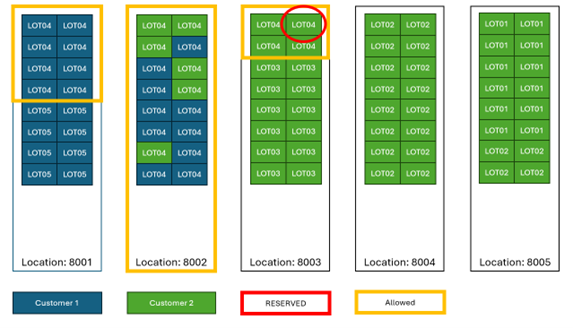
In this example, a pallet from LOT4 located in location 8003 is reserved. Since the LOC. FILTER parameter is not used, the system allows swapping with any pallet from LOT4 — even if the pallet belongs to a different customer. In the background, the system automatically performs a customer transfer to make the swap possible. This can lead to mixed storage locations or unintended customer-related stock movements, which may not always align with operational or audit requirements.
Practical Example 2: With LOC. FILTER
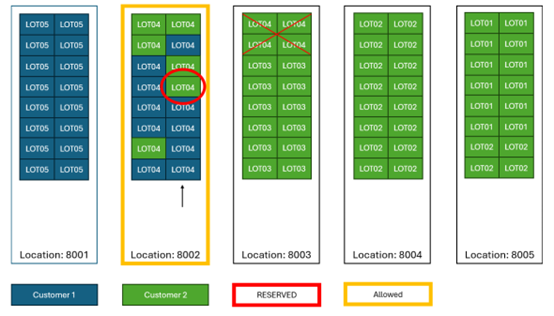
In this case, a pallet with LOT4 located in location 8002 is proposed. With the LOC. FILTER parameter enabled, the system will not allow a batch swap with pallets from LOT4 stored in location 8003.
This restriction was introduced to reduce the number of mixed locations in the warehouse. Since the system performs a customer transfer behind the scenes when swapping between customers, enabling this parameter prevents swaps that would move inventory across locations — like swapping with one of the four pallets in 8003 in this example. By enforcing location-based control, this feature helps maintain cleaner stock organization and reduces unintended cross-location movements.
2. Scan Function: 11155093 – 232 Swap Carriers in Detail/Item Journal/Warehouse Activity
This function allows you to swap handling units during picking within the same customer, under configurable conditions. You specify two parameters: CARRIERNO 1 (typically the reserved pallet) and CARRIERNO 2 (the scanned pallet).
Core Matching Parameters:
- SAME BATCH –
CARRIERNO 2must have the same internal batch asCARRIERNO 1 - SAME EXT. BATCH –
CARRIERNO 2must have the same external batch - SAME EXP. DATE –
CARRIERNO 2must have the same expiration date - SAME PROD. DATE –
CARRIERNO 2must have the same production date - MATCHCARRIERTYPE –
CARRIERNO 2must be of the same carrier type
Exclusion Parameters (to block the swap):
- EXCL. ORDER TYPES – Swap not allowed if
CARRIERNO 2is part of a different order type - EXCL. SHIPMENT – Swap not allowed if
CARRIERNO 2is part of another shipment - EXCL. ITEM JNL – Swap not allowed if
CARRIERNO 2is part of an item journal - EXCL. ACT CODES – Swap not allowed if
CARRIERNO 2is involved in warehouse activities (requires entering the activity’s action code)
Quantity Margin Parameter:
- QTY Margin % – Allows you to define the acceptable percentage difference in quantity between
CARRIERNO 1andCARRIERNO 2.- Default is typically 100% (quantities must match exactly)
- For industries like meat, fish, or produce, where minor weight deviations are normal, a lower percentage can be configured to allow the swap.
Practical Example 3: Swap With No Optional Parameters
The example below shows which pallets are eligible for swapping when none of the optional parameters are filled in.
In this case, the system applies only the basic validation and will allow more flexible swaps, as long as the carriers belong to the same customer.
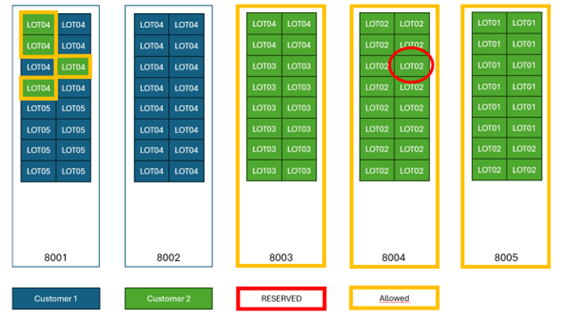
In this scenario, the reserved pallet is from LOT02. However, because the SAME BATCH parameter is not enabled, the system allows you to pick any pallet with the same item and quantity, regardless of the batch.
All eligible pallets are marked in yellow in the example. This illustrates how flexible the swap logic becomes when strict batch validation is turned off.
3. Combination of Both Functions
You can also use these functionalities in combination with the standard swap function:
Scan function: 11155093 – 232 Swap Carriers
This setup provides even more flexibility when picking or swapping pallets — for example, when you only want to allow swaps between customers if the batch is the same, but allow within-customer swaps even if the batch differs.
Practical Example 4: Combination of both swap functions
Scan Function: 11155091 – 102 Swap Batch Content WITH LOC. FILTER (in this case) This function requires a criteria function set such as:
CUSTNO <> CUSTNOPALLET
➤ This ensures that when the scanned pallet belongs to a different customer than the reserved one, the system uses the Swap Batch Content function (which supports customer transfers and location filtering).Scan Function: 11155093 – 232 Swap Carriers It requires a criteria function set such as:
CUSTNO = CUSTNOPALLET
➤ This ensures that swaps within the same customer use the Swap Carriers function for faster and simpler validation.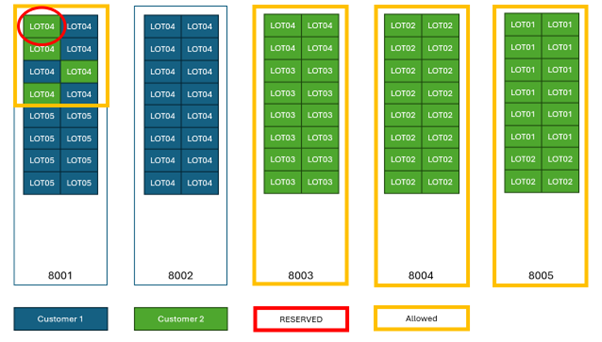
Important Note:
All pallets in this scenario have the same item and same quantity.
- If a pallet in location 8001 with LOT4 is reserved:
- You are allowed to swap it with another LOT4 pallet in the same location for a different customer, because
LOC. FILTERis applied in the Swap Batch Content function. - You are also allowed to pick pallets from locations 8003, 8004, and 8005, as long as they belong to the same customer, and the item and quantity match.
These are handled by the Swap Carriers function.
- You are allowed to swap it with another LOT4 pallet in the same location for a different customer, because