Status Setup
General
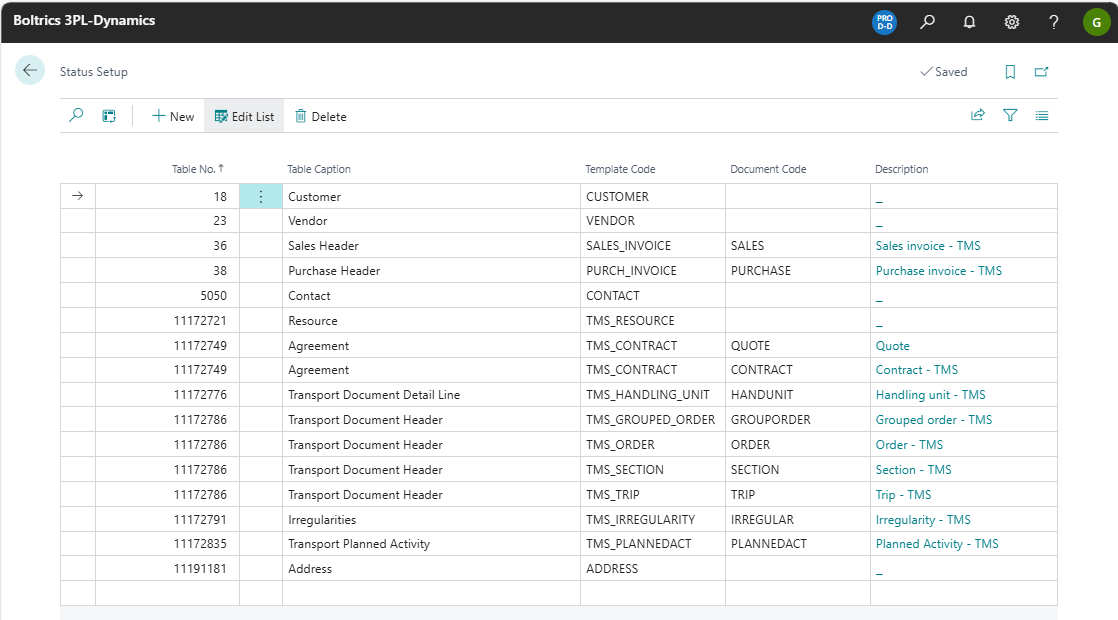
On the page an overview of which Status Template is to be applied on what table and documentcode. As in 3PL Dynamics various types of documents can be stored in one table the Document Code will determinate what type of document is applicable.
When installing a 3PL Module via Boltrics Market Place a default status setup applicable on the specific module will be applied.
Warning
Modifications to this settings on this page will have major consequences on the workflow on operational processes!.
Functionality
Actions
New: Adds a new record above the selected line.Edit List: Changes to edit-modus.Delete: Deletes the selected line.
Fields
Table No.: The table number on which the Status Template as set in the column: Template Code is applicable.Table Caption: The caption/title related to the field: Table No..Template Code: The Status Template to be applied to the combination of Table No. and Document Code.Document Code: As some tables in 3PL Dynamics can contain various document types the Document Code to be used to apply the Status Template.Description: The description related to the Document Code.