Communication Schedule
General
In a Communication Schedule can be defined on what days and by what frequency a Planning Line, linked to a Communication Action. has to be executed.
Functional
Actions
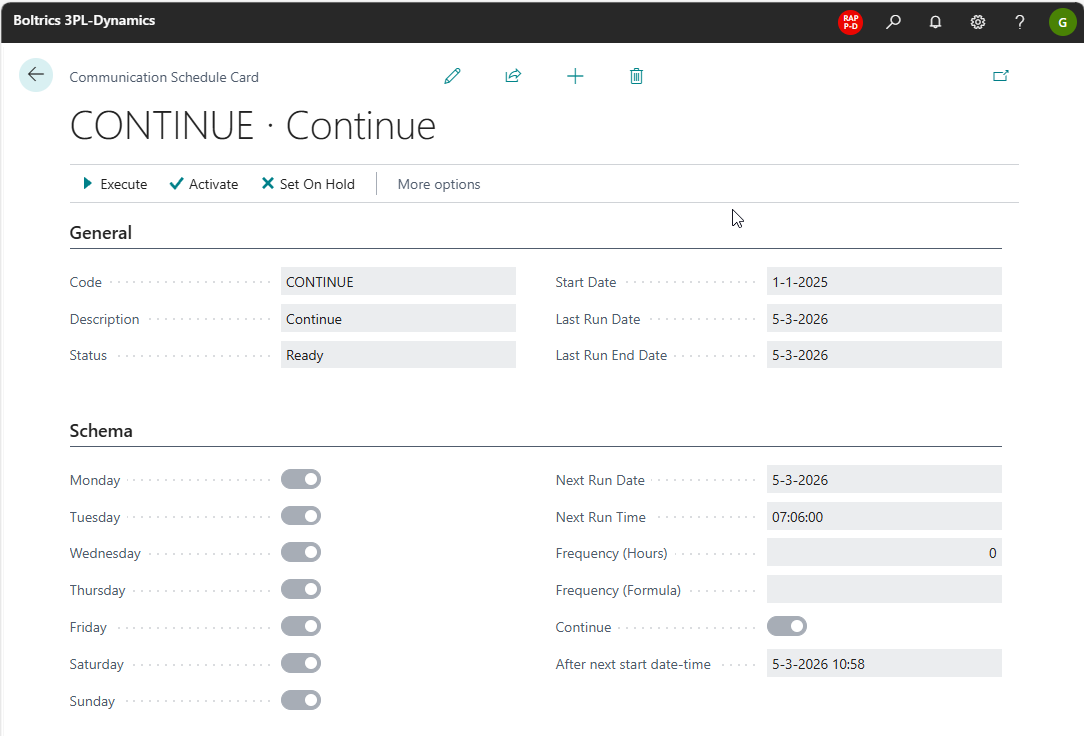
Exectute: Executes the schedule.Activate: Will change the status of the schedule to: Ready when the status is: On Hold.Set on Hold: Will change the status of the schedule to: On Hold when the status is: Ready.
Fields
Code: The unique code of the scheduleDescription: The description of the schedule.Status: The status of the schedule, options: Active and On Hold.Start Date: The date on which the schedule was or must be activated.Last Run Date: The date on which the schedule has been last executed.Last Run End Date: The end date on which the schedule has been last executed.Monday: Shows if the schedule is applicable on a Monday. Options: Yes/No.Tuesday: Shows if the schedule is applicable on a Tuesday. Options: Yes/No.Wednesday: Shows if the schedule is applicable on a Wednesday. Options: Yes/No.Thursday: Shows if the schedule is applicable on a Thursday. Options: Yes/No.Friday: Shows if the schedule is applicable on a Friday. Options: Yes/No.Saturday: Shows if the schedule is applicable on a Saturday. Options: Yes/No.Sunday: Shows if the schedule is applicable on a Sunday. Options: Yes/No.Next Run Day: The first day on which the schedule is applicable.Next Run Time: The first time on which the schedule is applicable. If date/time is in the past the schedule will not be operating.Frequency: Set if the schedule is to be executed at hourly intervals.Frequency (formula): Apply an formular if a specific interval is applicable on the schedule.Continue: 'Continue:set if the schedule is to be executed continuously.After next start/date-time: Shows at what date/time the next schedule will be executed.