Communication Actions
General
Communication Actions can be set to define what actions to be performed in a Communication log.
Examples of actions:
- ETA e-mails on the expected time of arrival of a loading activity.
- ETA e-mails on the expected time of arrival at a Depot.
- ETA e-mails on the expected time of arrival of an unloading activities.
- POD e-mails to send a proof delivery to a Customer.
Functionality
Communication Actions
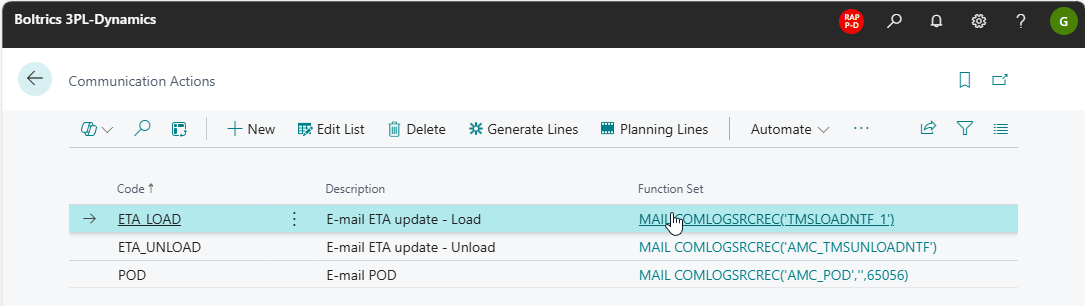
Actions
New: Creates a new line below the selected line.Edit List: Changes to Edit-modus.Delete: Deletes the selected line.Generate Lines: Opens a selection page to create and link new Planning Lines to the selected line.Planning Lines: Opens the page Planning Lines related to the selected line.
Fields
Code: The unique code of the communication action.Description: The description communication action.Function Set: The Function Set to be executed.
Examples of functionset applicable on the Communication Actions:
Communication Planning Lines
Planning lines must defined so that, for each Communication Action, it can be determined for which source type or specific source and based on what schedule the action must be carried out.
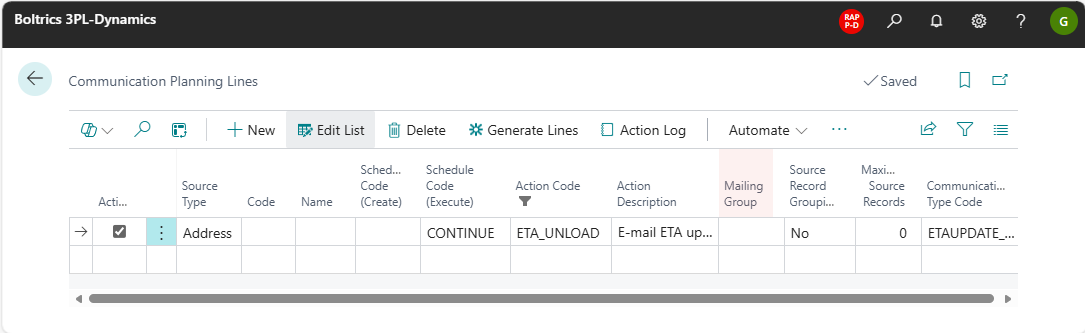
Actions
New: Creates a new line below the selected line.Edit List: Changes to Edit-modus.Delete: Deletes the selected line.Generate Lines: Opens a selection page to create and link new Planning Lines to the selected line.Action Log: Opens the page: Commmunication Logs for the Communication Action Code as defined on the Planning Line.
Fields
Active: Options: True/False.Source Type: Options: Mailing Group, Salesperson, Customer, Vendor, Resource, Shipping Agent, Contact, Employee, Address, User, TMS Driver. For TMS Driver, see Send communication to a driver.Code: The unique code related to the selected Source Type. The value selected acts as a filter when processing a line.Name: The name of the selected Code.Schedule Code (Create): -Schedule Code (Execute): The Communication Schedule applicable on the line.Action Code: The Action Code applicable on the line.Action Description: The description related to the Action Code.Mailing Group: A mailing group can be created which can contain a selection of ContactsSource Record Grouping: Options: Yes/No.Maximum Source Records: -Communication Type Code: The Communication Type Code related to the line.