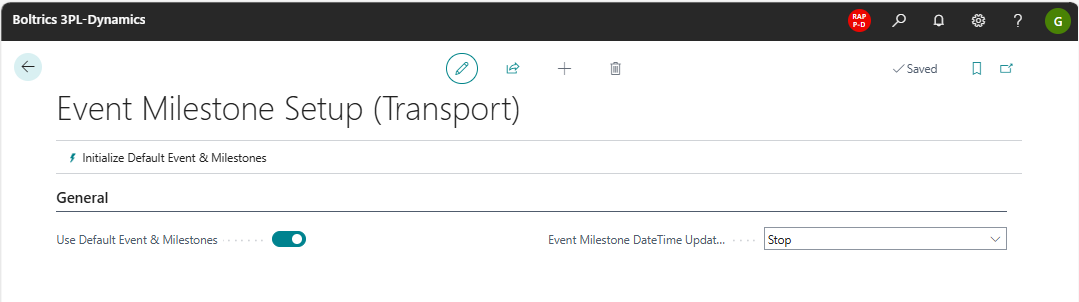
Event & Milestones (Transport) Setup
General
This page contains the settings on the functionality: Events & Milestones (Transport)
Functionality
Click on the action: Initialize Default Event & Milstones to activity the default setup of the functionality.
Record actual dates and times in one time zone
By default, the actual date and time of an event or milestone is recorded in the time zone of the session that registers it. The same milestone can therefore get a different time depending on how the order was created. For example, an order created in Business Central gets the time zone of your Business Central session, while an order created through the App Platform can get a UTC time.
Sessions that the App Platform starts use the Default Time Zone from 3PL Dynamics setup. To record the actual date and time of automatically registered milestones consistently, turn on the conversion:
- Choose the
 icon, enter 3PL Setup, and then choose the related link.
 - Make sure the Default Time Zone field is filled in, for example W. Europe Standard Time.
- Open the Event Milestone Setup (Transport) page in the same way.
- In the General section, turn on Convert Date/Time to Default Time Zone.
The setting is turned off by default, so existing behavior doesn't change until you turn it on. Once it's on, the following milestones get an actual date and time in the converted time zone:
- TMS Order Created: the creation time of the order is converted.
- Released, Planned, and POD Received: the current date and time is converted.
The setting only affects new actual dates and times. Existing event milestone entries, estimated and updated dates and times, and the local dates and times that are based on an address time zone stay the same.
Actions
Initialize Default Event & Milestones: This action initializes the default Event & Milestones.
Fields
Use Default Event & Milestones: When the action: Initialize Default Event & Milestones has been activated this field will be set to: True.Event Milestone DateTime Update: Options: Stop: applies the datetime of the Stop or Update: applies the datatime of the update.Convert Date/Time to Default Time Zone: Converts the actual date and time of automatically registered milestones to the time zone of the session, as described in Record actual dates and times in one time zone.