Events & Milestones
General
Use events and milestones to support users in the process of executing Trips and to communicate dates and times with other parties, such as customers and consignees. The difference between a milestone and an event is that a milestone is always an expected occurrence, whereas an event is not.
Examples of Events & Milestones
| Type | Examples |
|---|---|
| Events | Order not loaded, Goods damaged, Goods missing, Late delivery, etc. |
| Milestones | Order Created, Order Planned, Order Loaded, Order arrived at Depot, Driver is onroute for delivery, Order unloaded, POD Received, etc. |
Structure Event & Milestones
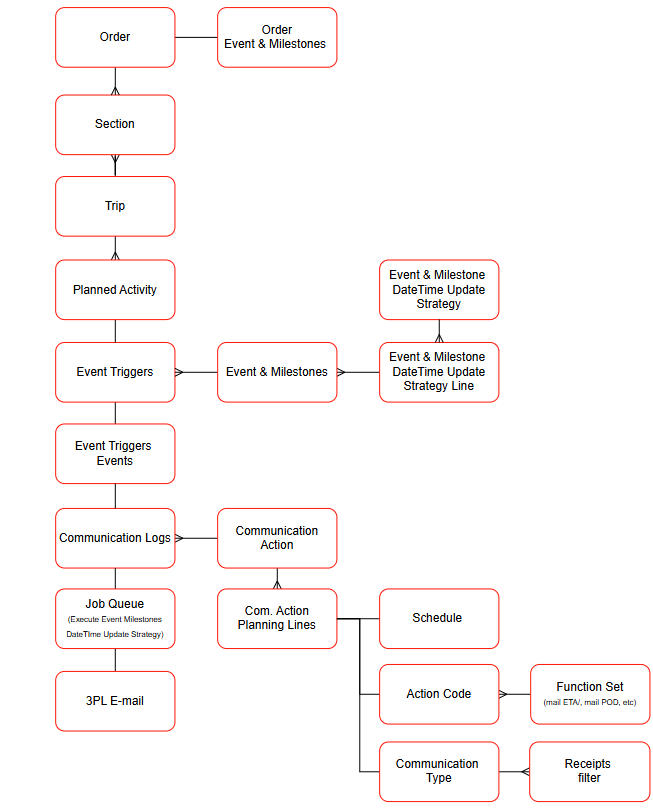
The structure of Events and Milestones and the relationships with other functionality are shown in the following diagram:
Date/time logic
In the Event & Milestone functionality several descriptions of date-time fields are being used. To understand the functionality it is important to understand the functionality on these fields:
Estimated Date/time: The date/time based on the Planned Activity related to a (un)load activity of an Order.Updated Date/time: The new date/time calculated when a Trip is in progress and Planned Activity have been recalculated.Original Date/time: The initial date/time communicated in a Communication Log, based on the Planned Activity related to a (un)load activity of an Order.Actual Date/time: The date/time of realization of the Planned Activity related to a (un)load activity of an Order.
On the following events the following date/time descriptions will be used:
Order created: The actual date/time on which an Order has been created.Order released: The actual date/time on which an Order has changed to the status: Released.Order planned: The actual date/time on which an Order has been planned on a Trip.Order loaded: The scheduled date/time, communicated date/time or realized date/time of the loading activity related to the Order .Order unloaded: The scheduled date/time, communicated date/time or realized date/time of the unloading activity related to the Order .POD received: The actual date/time on which an POD has been attached to an Order.
Functionality
Actions
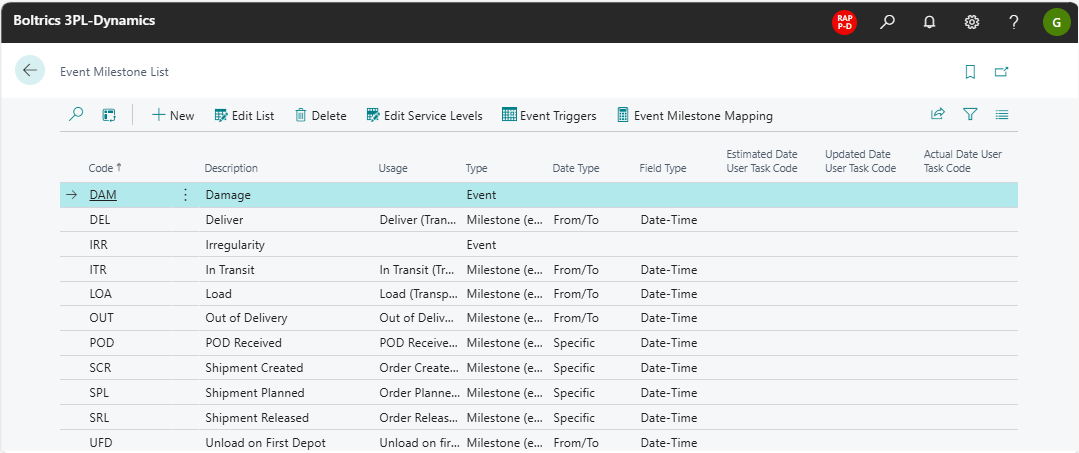
New: Creates a new entry below the selected line.Edit List: Changes to edit-modus.Delete: Deletes the selected line.Edit Service levels: Functionality not applicable on TMS.Event Triggers: Opens the page: Event TriggersEvent Milestone Mapping: Functionality not applicable on TMS.
Fields
Code: The unique code for the line.Description: The description related to the code.Usage: A set of values is available. Select the usage that applies to the entry.Type: Options: Event, Milestone (internal), and Milestone (external).Date Type: Options: Specific (one date or date-time), Earliest/Latest, and From/To (a period).Field Type: Options: Date and Date-Time.Estimated Date User Task Code: The date/time based on the Planned Activity related to a (un)load activity of an Order.Updated Date User Task Code: The new date/time calculated when a Trip is in progress and Planned Activity have been recalculated.Actual Date User Task Code: The date/time of realization of the Planned Activity related to a (un)load activity of an Order.
Settings
The following pages contain settings on the Event & Milestones functionality.
Tip
Start by initializing the Event & Milestone functionality on the page: Event & Milestones Setup (Transport)
- Event & Milestones Setup (Transport) the basic settings applicable on the functionality Event & Milestones.
- Event Milestone List an overview of events and milestones configured.
- Event Milestone Date Time Update Strategy functionality to be capable of controlling the generation of dates/times.
- Event Trigger List what action to perform when an Event or Milestone is triggered.
- Job Queue Event & Milestones Date Time Update Strategy will automatically update the dates/times determined as scheduled in the job queue.
- Order Type (TMS) which Event & Milestone Template is applicable per order type.