Event Trigger List
General
On this page actions can be defined which have to be execute when an Event or Milestone is triggered.
Example of events:
| Trigger | Description |
|---|---|
| Event Trigger ETA Mail | Will generate a Communication Log Entry which will send an e- mail to inform a party of an Order being planned for delivery. |
| Event Trigger |
Functionality
Tab: General
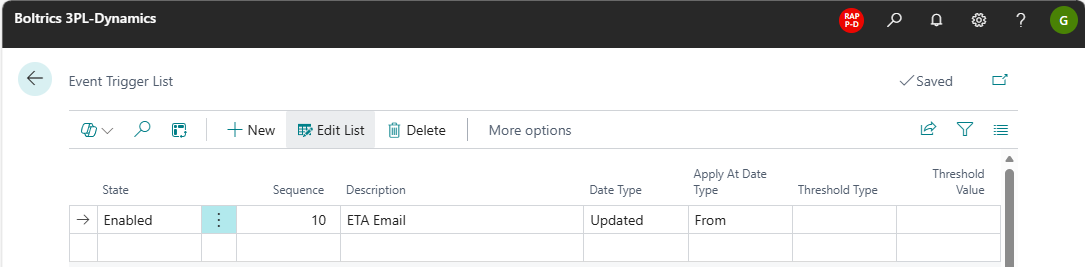
Actions
New: Creates a new line below the selected line.Edit List: Changes to edit-modus.Delete: Deletes the selected line.
Fields
State: Options: Enabled and Disabled.Sequence.: The sequence on which lines will be executedDescription: The description of the event trigger.Date Type: Options: Estimated, Updated and Actual.Apply At Date Time: Options: From and To.Threshold Type: Options: Minutes, Hours and DaysThreshold Value: the value applicable to the Threshold Type.
Tab: Event Trigger Events
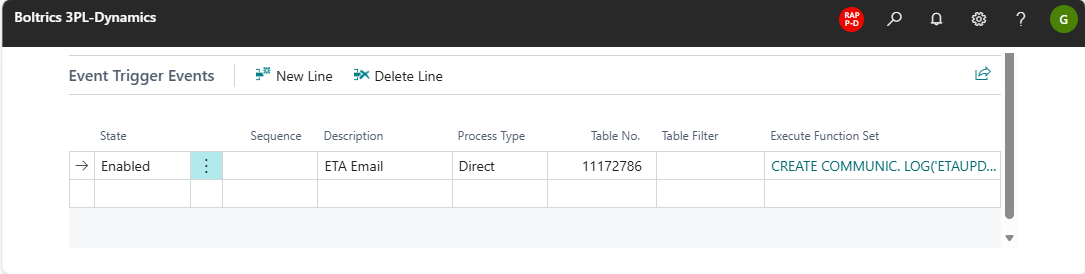
Actions
New line: Creates a new line below the selected line.Delete line: Deletes the selected line.
Fields
State: Options: Enabled and Disabled.Sequence.: The sequence on which lines will be executedDescription: The description of the event trigger.Process Type: Options: Direct: the event will be triggered directly, Batch: the event will be triggered based on a schedule. This can be used to inform parties a certain amount of time before the event.Table No: Default: 11172786, the TMS Document Header.Event Function Set: the function-set to be applied.