Event Milestone Date Time Update Strategy
General
By setting up strategies on the page: Event Milestone Date Time Update Strategy the system will automatically apply certain rules when generating Date- and time-values in the Event & Milestone Functionality.
The date-time-values can be used in the Communication Log Entries to inform parties like Customers or Addresses on ETA's.
Functionality
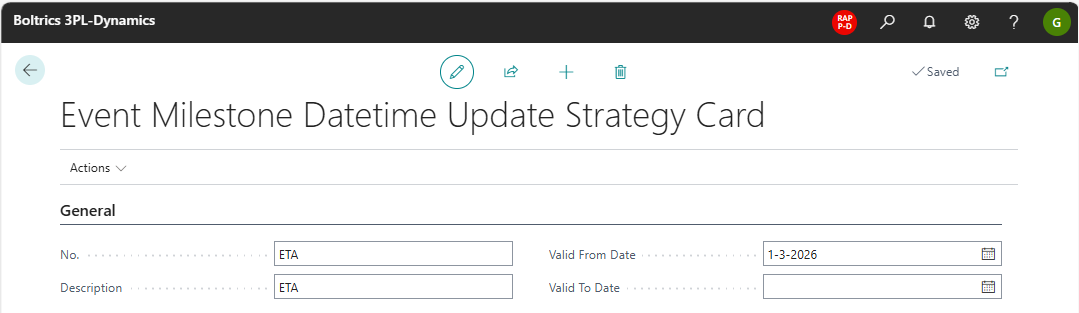
Event Milestone Date Time Update Strategy Header
Actions
Export Package: To generate a Json-file of the selected Event Milestone Date Time Update Strategy.Import Package: Te import a Json-file with an Event Milestone Date Time Update Strategy.
Fields
No.: The unique code for the Event Milestone Date Time Updated Strategy.Description: The description of the Event Milestone Date Time Updated StrategyValid From Date: The first date on which the Event Milestone Date Time Updated Strategy is applicable.Valid To Date: The last date on which the Event Milestone Date Time Updated Strategy is applicable.
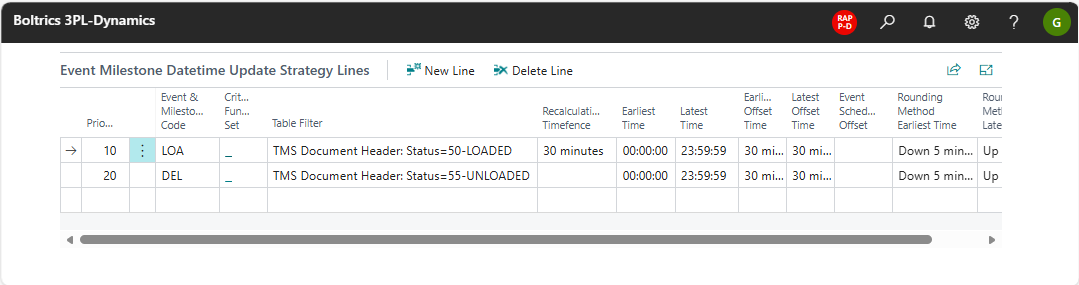
Event Milestone Date Time Update Strategy Line
Actions
New Line: Will create a new line below the selected line.Delete Line: Will delete the selected line.
Fields
Priority: The priority on executing lines.Event & Mileston Code: The Event & Milestone Code on which the line appliesCriteria Function Set: If required a specific criteria filter can be set.Table Filter: A filter can be applied so that the strategy-functionality is only applied when Orders have a specific Status.Recalulation Timefence: Can be set to avoid an update being triggered if the difference is less than the value set.Earliest Time: When set no communication will be created if the estimated time is before the value set. For Example when set to 07:00 and the time estimated is 05:00 no communication will be created. Normally the planning of the Trip must be reviewed and modified.Latest Time: When set no communication well be created if the estimated time is after the value set. For Example when set to 17:00 and the time estimated is 17:30 no communication will be created. Normally the planning of the Trip must be reviewed and modified.Earliest Offset Time: The value set will be substracted from the time calculated. For example when set to 00:30 and the time estimated is 12:10 the determined time will be set to 11:40. This setting will generete a large time-window.Latest Offeset Time: The value set will be added to the time calculated. For example when set to 01:00 and the time estimated is 12:20 the determined time will be set to 13:20. This setting will generete a large time-window.Event Schedule Offset: When set the specified Milestone Trigger is nog executed directly but scheduled at the offset time of the Update Date and Time.Rounding Method Earliest Time: Options: No Rounding, Down 5 minutes or Up 5 minutes. For Example when set to Down 5 minutes and the time estimated is 10:28 the determined time will be set to 10:25.Rounding Method Latest Time: Options: No Rounding, Down 5 minutes or Up 5 minutes. For Example when set to Up 5 minutes and the time estimated is 13:03 the determined time will be set to 13:05.