TelnetProxy V2
TelnetProxy is the scan application for RF scanning. If you have scanners that can run a browser, please check out AppPlatform.
Version overview
| Release Date | Version | Supported | Comments |
|---|---|---|---|
| 2026-04-14 | 4.6 | Yes | use new BC endpoint + updated to .NET 10.0 |
| 2026-02-09 | 3.23 | Yes | improved stability |
| 2026-01-23 | 3.22 | Yes | bugfix to prevent '429 - Too many requests' |
| 2025-12-04 | 3.20 | Yes | bugfix error on canceling |
| 2025-11-04 | 3.19 | Yes | minor bugfixes |
| 2025-11-03 | 3.16 | Yes | Increased secret expiration duration to 10 years |
| 2025-11-03 | 3.12 | Yes | Support multiple app registrations |
| 2025-10-14 | 3.8 | Yes | updated latest dependencies |
| 2024-05-03 | 3.2 | No | updated to .NET 8.0 |
| - | 2.* | No | new TelnetProxy-v2, that supports OAuth2 + SaaS |
| - | 1.0 | No | unsupported |
Check my version
Navigate to the folder TelnetProxy-v2 is installed. Often C:\Program Files\Boltrics\TelnetProxy-V2. There are 2 ways to check the version:
Rightclick the executable
TelnetProxy-v2.exe, and click properties. In the 'Details' tab, you'll find the version.Run
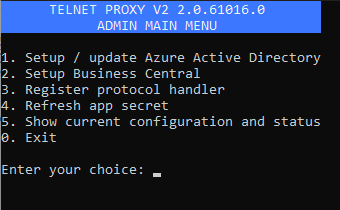
admin.cmdas Administrator. The following menu will appear, you can see the version in the blue title bar:
Update to the latest version
If you don't have already the version 3.23, you can download it here:
Download the setup for the installer here. This is the recommended way, and necessary if you install TelnetProxy the first time on a server/desktop:
TelnetProxy-v2-setup.exeDownload the standalone executable here, for replacing the previous one, or custom setups:
TelnetProxy-v2.exe
If you want the latest version 4.x, you can download it here. Please note this can cause breaking changes: