Grouped Criteria
By setting Grouped Criteria as a Function in the Status Template, Orders can be automatically combined on a Grouped Order.
Steps
- Choose the
 icon, enter Grouped Criteria, and then choose the related link.
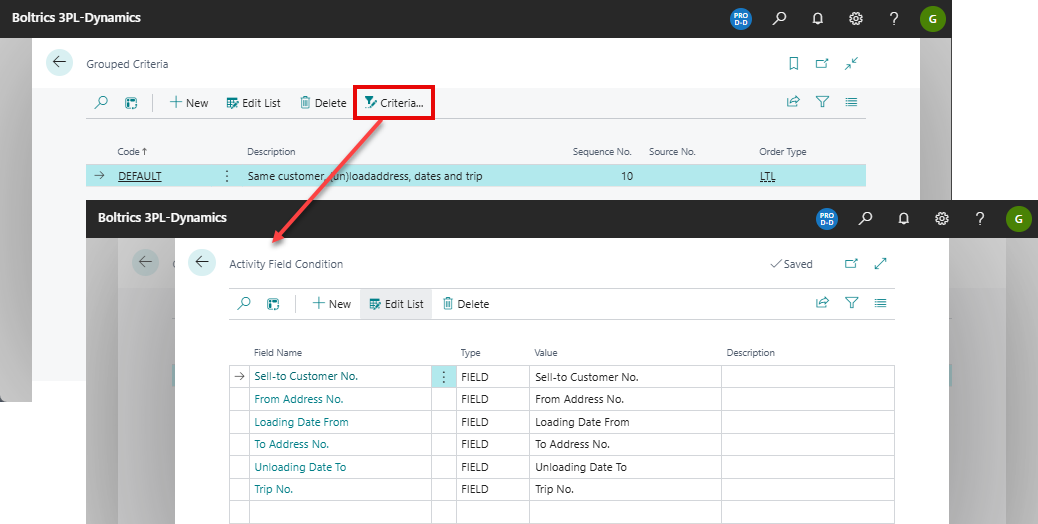
 - Adjust the grouping criteria by selecting Criteria… in the top menu. This opens the Activity Field Condition page.
- Add grouping criteria on each line. Orders are only grouped when ALL listed criteria match. Common examples of criteria include:
Sell-to Customer No.
From Address No.
Loading Date From
To Address No.
Unloading Date To
Trip No.
Note: This is not a complete list; additional criteria are possible.
Note
When including Trip No. as a grouping criterion, the grouping must be executed in a status after the orders have been planned and delivered, typically order status 60-TOCHECK or later.
If grouping is executed earlier, the Trip No. field is still empty and will not be applied.
Example
In the example below, you can see the list of grouping criteria on the Activity Field Condition page.