Area
General
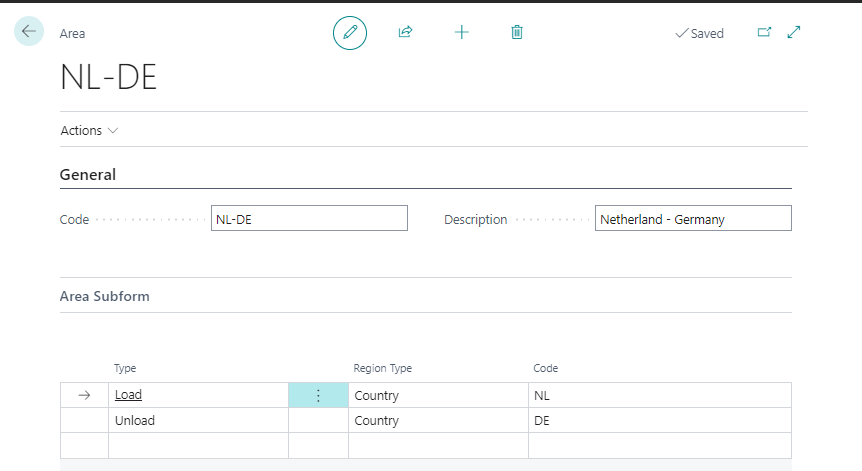
An area is a combination of one loading region and one unloading region. Use areas to group addresses by where a transport starts and ends, so you can set prices, sections, and plan boxes per lane instead of per address. Areas are used in the following functionality:
- Contracts
- Plan Box List
- Section Configuration Depending on the diversity of planning and contracts each company will require different areas to be set up.
Functionality
TMS prioritizes each area automatically. You can see this priority on the Plan Box List. The priority consists of 4 digits: the first 2 digits are for loading and the last 2 digits are for unloading. A lower number means a more specific match. For example, an area on an address (01) is more specific than an area on a country (09). Because of this priority, TMS always applies 1 specific area.
| Type | Priority |
|---|---|
| Address | 01 |
| Address Region | 02 |
| Post Code | 03 |
| Post Code Region | 04 |
| City | 05 |
| City Region | 06 |
| County | 07 |
| County Region | 08 |
| Country | 09 |
| Country Region | 10 |
| Other | 11 |
| Port | 12 |
| Port Region | 13 |
Fields
| Field | Description |
|---|---|
| Code. | The unique code for the area. |
| Description | The description of the area. |
| Type | Fixed value on the first line: Load. Fixed value on the second line: Unload. |
| Region Type | Use the drop-down-button to select the required region-type. |
| Code | Use the drop-down-button to select the required value. The selection of values depends on the Region Type selected. |