Milk Run Strategy
General
By setting up a milk run strategy, a Planbox can automatically be determined when Orders are released.
Tip
By using a criteria function in the header of the milk run strategy, it is possible to determine a specific Planbox on specific days of the week. The field: Result Plan Box Function on the Routing Strategy Line may not be visible. Use the Personalize function to show this field.
Functionality
When an Order is released, the system will check the Plan Box Routing Strategy as part of this routing strategy, the Function GET MILKRUN PLANBOX can be set in the field: Result Plan Box to verify whether a valid Milkrun Strategy and its associated Milkrun Template can be identified.
Splitting an order across a milk run/route network
An order can start in one milk run/route and end in another, for example a national order that starts in a regional milk run and finishes on a different regional route. Instead of setting up a Section Configuration manually for every leg, the system can determine the network automatically:
- The system checks the milk run/route strategies in the order set by the
Priorityfield, lowest value first. - For each strategy it checks whether the strategy (and, per line, the strategy line) applies to the order, using the Table Filter and Criteria Filter Set, and whether the line is valid on the loading or unloading date.
- When a line's Result Template (the Milk Run Template) contains the from address (on the loading date) or the to address (on the unloading date), the system looks up the Section Configuration whose
Milk Run/Route Template Codematches that template and applies it to that leg only.
For example, a transport order from Groningen to Heerlen can pass through a default hub address (for example Breda), then have its Groningen-side leg split further according to the Section Configuration linked to the Groningen milk run/route, and its Heerlen-side leg split according to the Section Configuration linked to the Heerlen milk run/route.
To enable this, add the CALCULATE NETWORK function to a status template step of the order (for example the release step), after the initial section(s) have been created by the Update section function. The function can also apply a fixed default via address, and override the from address of the very first leg or the to address of the very last leg (first mile/last mile).
Milk Run Strategy Header
Fields
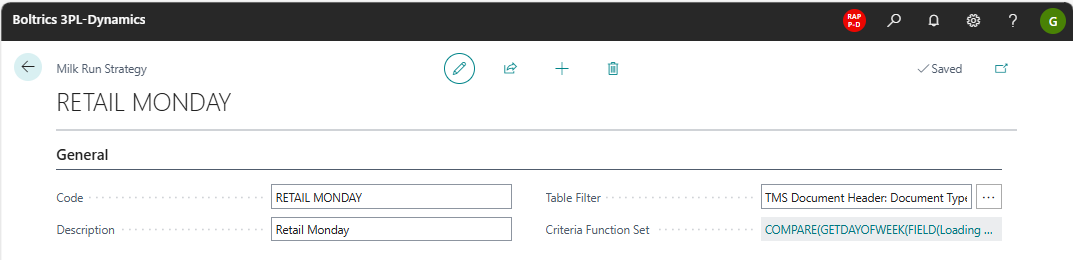
Code: The unique code for the milkrun strategy.Description: The description for the milkrun strategy.Priority: Determines the order in which milk run/route strategies are evaluated when splitting an order across a network. Strategies are checked starting with the lowest value.Table Filter: A filter can be set to apply a specific Milkrun Strategy on specific Orders. For example per department or customer.Criteria Filter Set: A filter can be set to apply a specific Milkrun Strategy on specific Orders. For example per workingday specific Milk Run Strategies may apply.
Milk Run Strategy Lines
Actions
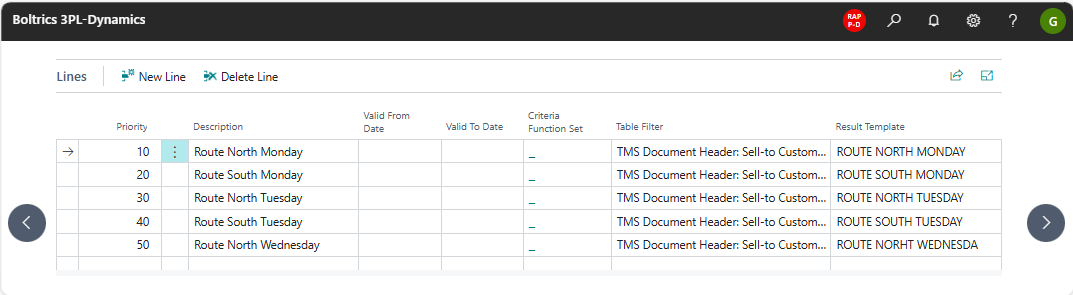
New Line: Adds a new line below the selected line.Delete Line: To delete the selected line.
Fields
Priority: When executing a Milk Run Strategy the sequence will be executed based on the value in the field: Priority.Description: The description for the milkrun strategy line.Valid From Date: Can be set if for specific dates specific strategies apply.Valid To Date: Can be set if for specific dates specific strategies apply.Criteria Filter Set: A filter can be set to apply a specific filter on the Milkrun Strategy Line.Table Filter: A filter can be set to apply a filter on the Orders when applying the Milkrun Strategy line.Result Template: The Milk Run Template which contains a list of Addresses applicable on the Milkrun Template.