Emission Calculation
General
For the calculation of CO₂ emissions for a Trip the system considers the truck’s average fuel consumption, as defined in the Vehicle Profile, along with the planned route/distance. In 3PL Dynamics, the Emission Calculation functionality automatically determines and records emission information for a Trip and allocates it across the Sections planned on the trip. This also enables emissions to be calculated and presented per Order.
Note
A PTV User & Sustainability Management Licence is required to use the Toll Calculation functionality.
Functionality
Trip Emisson Details
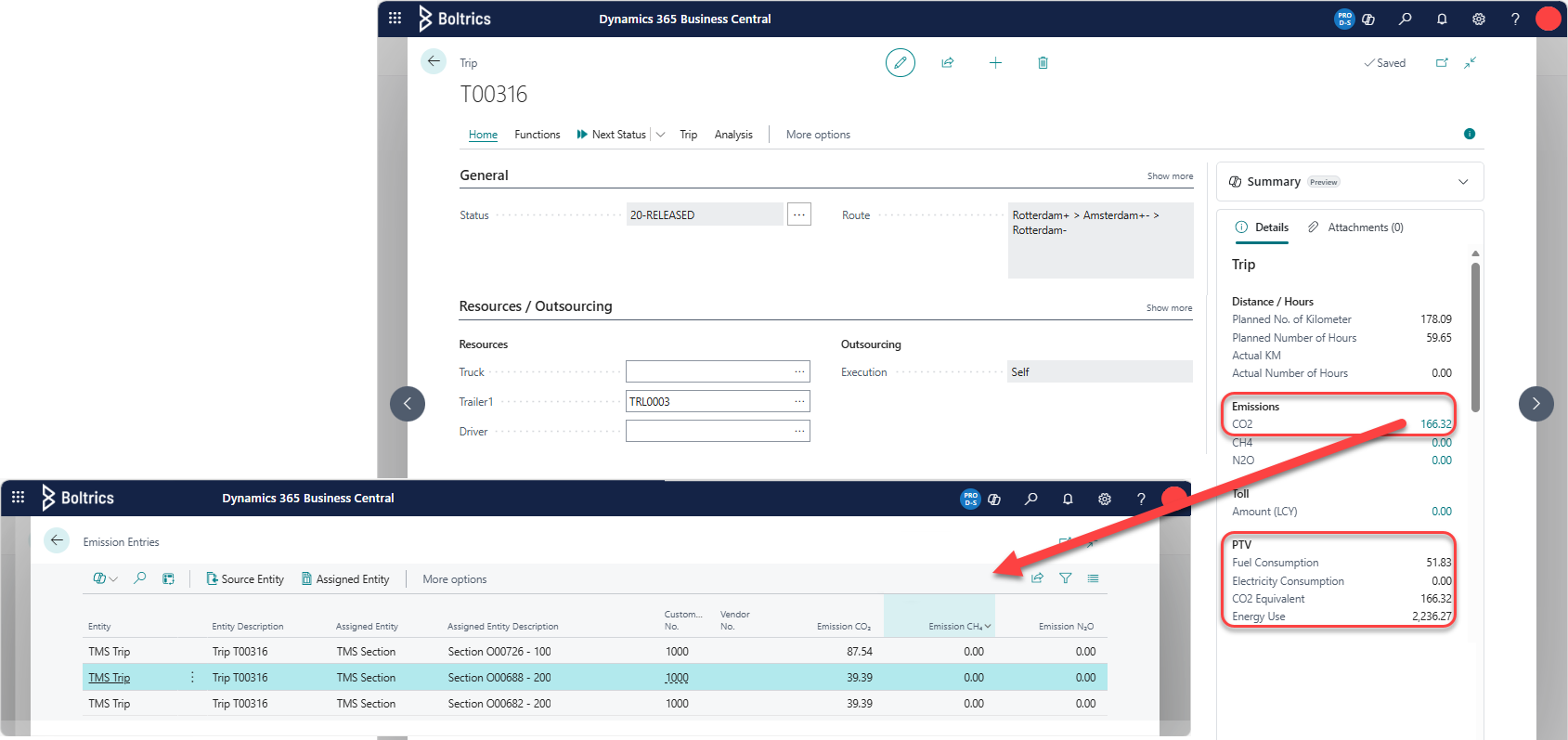
On Trip List and Trip Card pages, the Trip factbox under the PTV Section: displays values retrieved from the PTV-Developer-API. The total CO2 emission on the Trip is displayed under the section: Emissions. By clicking on this CO2 value a detailed view of the emissions per Section is opened.
Tip
The CO2 Emission value per Section and Order can be consulted in the factboxes: Order, section: Emission on the list- and cardpages of the Order and Section.
Best Practice Example
A Trip contains the following 3 Sections:
| Section | Load Sequence | Unload Sequence | Distance | UOM (Ldm) | From Address City | To Address City |
|---|---|---|---|---|---|---|
| A. | 100 | 5.000 | 85,68 km | 2 | Rotterdam | Amsterdam |
| B. | 100 | 5.000 | 85,68 km | 2 | Rotterdam | Amsterdam |
| C. | 200 | 5.000 | 76,17 km | 5 | Amsterdam | Rotterdam |
When the action: Calculate is triggered on the Trip the following value will be show in the field: Route: Rotterdam+ > Amsterdam+- > Rotterdam- As no vehicle has been planned on the trip, the default PTV Vehicle Profile as set on the page: PTV Setup will be used to calculate the emissions. In the factbox: Order the field: Emission: CO2 will contain the vaule: 166,32.
Depending on the Emisson Method set on the page: Transport Emission Setup the following breakdown will be made: The parameter: UOM Field must be set to 72: UOM2 which is set to Loading meters.
Breakdown by Carbon Footprint
| Section | Distance | UOM (Ldm) | Sum (Distance*UOM) | Ration Sum/Total | Co2 (total Co2*Ratio) |
|---|---|---|---|---|---|
| A. | 85,68 km | 2 | 171,358 | 23,6829194 % | 39,38943 |
| B. | 85,68 km | 2 | 171,358 | 23,6829194 % | 39,38943 |
| C. | 76,17 km | 5 | 380,835 | 52,6341612 % | 87,54114 |
| Total 723,551 |
Breakdown by Shortes Feasible
| Section | Distance | UOM (Ldm) | Sum (Distance*UOM) | Ration Sum/Total | Co2 (total Co2*Ratio) |
|---|---|---|---|---|---|
| A. | 85,68 km | 2 | 171,358 | 23,6829194 % | 39,38943 |
| B. | 85,68 km | 2 | 171,358 | 23,6829194 % | 39,38943 |
| C. | 76,17 km | 5 | 380,835 | 52,6341612 % | 87,54114 |
| Total 723,551 |
Breakdown by As the Bird Flies
| Section | Distance | UOM (Ldm) | Sum (Distance*UOM) | Ration Sum/Total | Co2 (total Co2*Ratio) |
|---|---|---|---|---|---|
| A. | 59,73581 km | 2 | 119,4716266 | 22,4799753 % | 37,38869 |
| B. | 59,73581 km | 2 | 119,4716266 | 22,4799753 % | 37,38869 |
| C. | 58,50295 km | 5 | 292,5147440 | 55,0400494 % | 91,54261 |
| Total 531,457 |
Settings
The following settings apply to the emission Calculation:
- PTV Setup, used to activate the PTV Developer and manage the: Default Vehicle Profile, Vehicle Profile and Vehicle Profile Conditions.
- Transport Emission Setup
- Vehicle Profile, to specify the settings of a Truck, for example, speed, fuel consumption and emissions.
- Functionset Emission Method, to specify how to devide the trip emissions per Section
- Functionset Emission Calculate,functionset to calculate emissons on a trip.