Toll clause
Use a toll clause to add toll to the revenue or costs of an order or trip automatically. The toll amount is based on the toll calculation entries of the route that PTV Developer calculates, optionally increased with a surcharge. See PTV Developer and Toll Calculations.
If you invoice toll to your customers with a surcharge, or if different contracts use different surcharges, set up multiple toll clauses.
How toll clauses work
A toll clause is linked to a contract or contract line. When TMS runs the contract strategy for the toll clause, it creates revenue lines (customer) and cost lines (vendor) from the linked toll clause, using the service, unit of measure, and calculation functions of the clause. To recalculate the toll lines, choose Recalculate Toll Clause on the order or trip. For more information, see Contract Strategy.
The toll lines are recognized on the contract detail line by the field Toll Clause. TMS creates these detail lines from the toll clause.
Set up a toll clause
- Choose the
 icon, enter Toll Clause List, and then choose the related link.
 - Choose New to create a toll clause.
- Enter a description, the Service No., and the Unit of Measure Code.
- Set the Quantity Calculation and the Unit Price Calculation.
- Link the toll clause to the contract or contract line that it applies to.
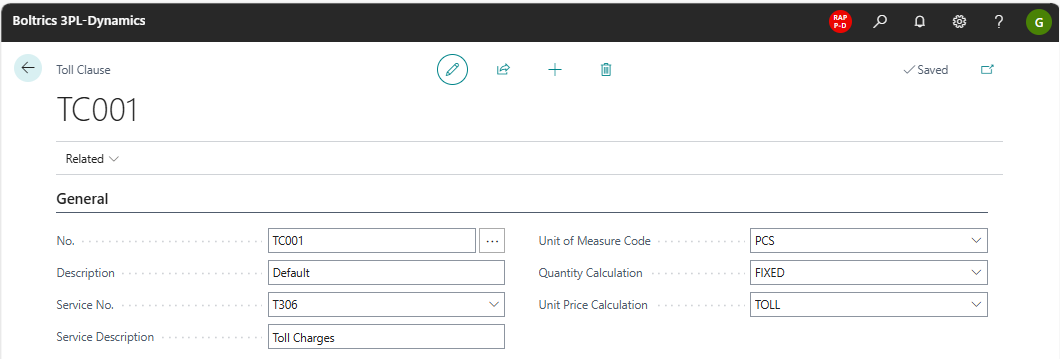
| Field | Description |
|---|---|
| No. | The unique number of the toll clause. The number series is set in Transport Setup. |
| Service No. | The service that is used on the toll revenue or cost lines. |
| Unit of Measure Code | The unit of measure that is used on the lines. |
| Quantity Calculation | The function set that calculates the quantity. The default value is FIXED. |
| Unit Price Calculation | A calculation function, Toll-Revenue, that bases the toll revenue on the toll calculation entries and adds a surcharge. |