Restriction
General
The restriction functionality enables automated checks during the planning process in TMS. For example in the status 20-RELEASED on the Trip a function is added which checks if no restriction-conflicts are applicable. A conflict can be that on one of the Addresses planned on the Trip requires a taillift and that the Truck/Trailer planned does not have a taillift.
Restriction can be set on records in the following tables:
When a restriction is set on a record one of the parameters must be set:
- Available
- Required
- Forbidden
If a restriction with the type: Forbidden is set on a Address which is planned on a Trip a conflict will be shown if one of the Resources has the same restriction but the type: Available. If a restriction with the type: Required is set on Truck which is planned on a Trip a conflict wil be shown if none of the other Resources has the same restriction but the type: Available. If a restriction with the type: Required is set on a Goods which is set on the goods-line of an Section which is planned on a Trip a conflict will be shown if none of the Resources has the same restriction but the type: Available.
Functionality
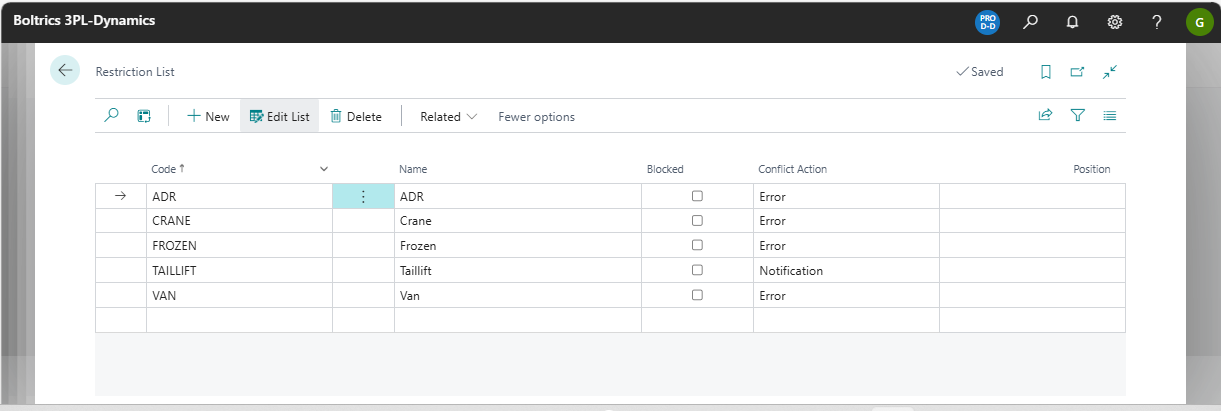
Actions
New: Adds a new record above the current selected record.Edit Listchanges to edit-modus.Delete: Deletes the current selected record.Related: Opens the menu: RelatedRestrictions: Opens the menu: RestrictionsWhere used: Opens a page containing al records containing the restriction selected.
Fields
Code: The unique code for the record.Name: The name for the record.Blocked: Options: True/False.Confliict Action: Options: Error, Irregularity, Irregularity & Notification and NotificationPosition: The sequence in which restrictions will be checked for conflicts.
Tip
By applying a Conflict Action the behaviour of the check is influenced.
Settings
The Market Place item: TMS Basic Setup contains a Status Template: TMS Trip. On the status 20-RELEASED a Check-Restrictions function has been set.