Status templates for transportation
This article describes the default status flows of the TMS documents: orders, grouped orders, sections, planned activities, and trips. For general information about status templates, see Status Templates.
The status of a document controls what a user can do with it and which functions run when the status changes, such as calculating kilometers, generating revenue or cost lines, or sending a trip to a board computer. Because the statuses of an order, its sections, its trips, and its planned activities update each other, the status flows together form the backbone of the TMS process.
How the flows work together
The following diagram shows the relations between the status templates of the TMS documents. The statuses marked with dotted lines don't always apply. They only apply in specific situations.
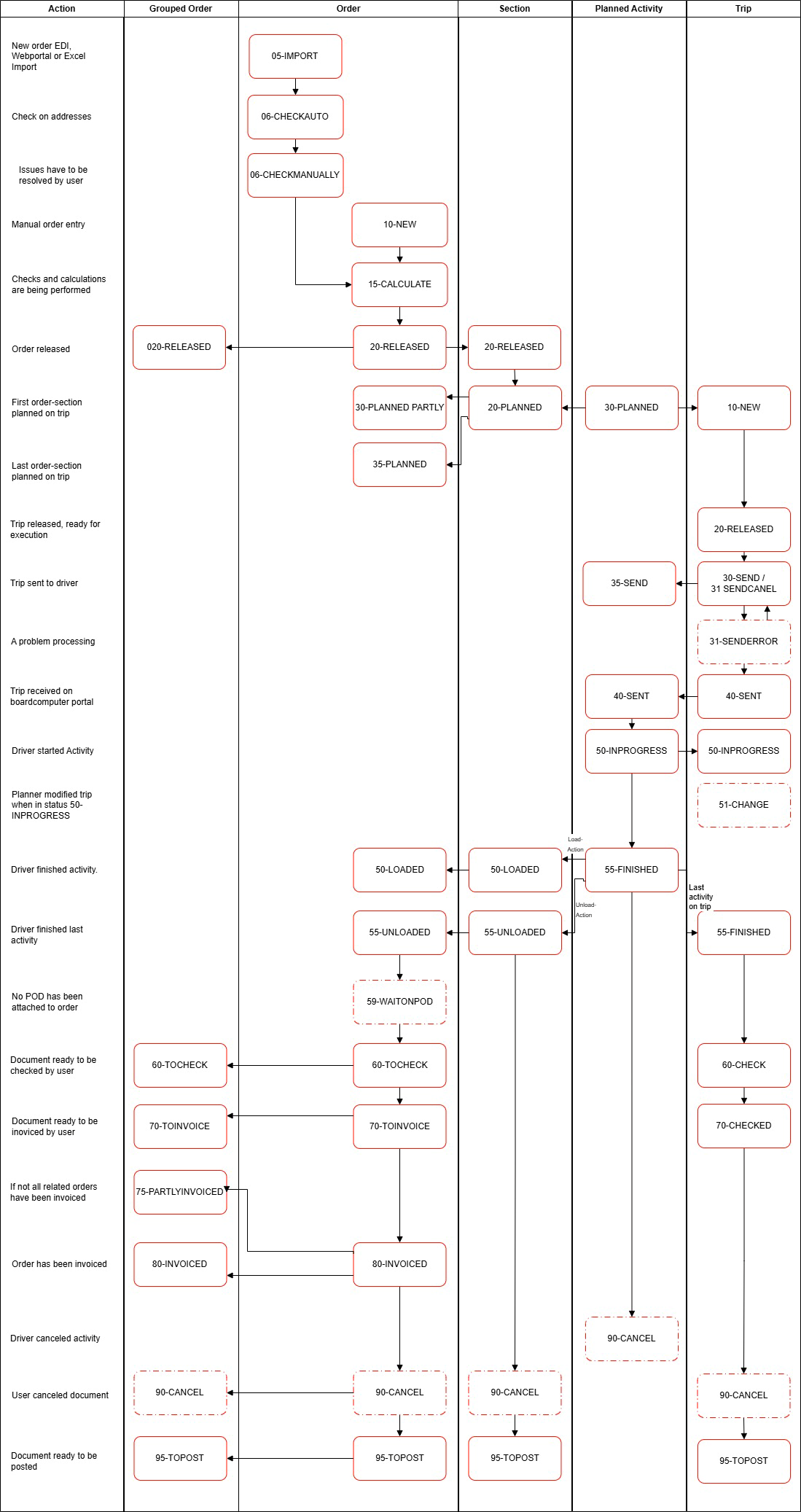
In short, a transport order moves through the flows in this order:
- An order is created and calculated (15-CALCULATE). Kilometers and revenue are determined.
- When the order is released (20-RELEASED), its sections are created and get their route configuration. The sections are then ready to be planned.
- When a section is planned on a trip, the section and the order get the status 35-PLANNED or 30-PLANNEDPARTLY.
- When the trip is released, sent to the driver, and executed, the statuses of the planned activities drive the statuses of the section, the order, and the trip.
- After unloading and the proof of delivery (POD), the order goes through 60-TOCHECK to 70-TOINVOICE and 80-INVOICED. The trip goes through its own check and invoicing statuses to settle the costs.
- Finally, the documents get the status 95-TOPOST and are posted. For more information, see Posting and Job Queue Posting TMS Documents.
The status template that a new document gets depends on its order type. If a document has no order type, the default status templates from Transport Setup apply.
Note
The flows on this page are the default flows that the Boltrics Marketplace app TMS Basic Setup installs. Your organization can adjust the status templates, so the statuses in your environment might differ from these tables.
Default status flows
For the default status flow of a customer, see Status Flow Customer.
Order status flow
The following default flow applies to the order.
| Status | Description | Remarks |
|---|---|---|
| 05-IMPORT | An automatically created order. | Applies to orders created via a data integration, the web portal, or an Excel import. |
| 06-CHECKAUTO | The (un)loading addresses are checked automatically. | If the check succeeds, the status changes to 15-CALCULATE. If it fails, the status changes to 06-CHECKMANUALLY. |
| 06-CHECKMANUALLY | The address determination or another check failed. | A user must check and correct the (un)loading address and the order. |
| 10-NEW | The status of an order that is created manually. | The user chooses Next status to go to 15-CALCULATE. |
| 15-CALCULATE | Mandatory fields are checked, kilometers are calculated, conditions and time windows are set, and the contract strategy runs. | Kilometers and revenue lines appear on the order. |
| 20-RELEASED | The sections are created, the section configuration is determined, and the estimated revenue calculation is made. | You can use function sets to add conditions automatically. The sections are ready to be planned. |
| 30-PLANNEDPARTLY | Not all sections of the order are planned on a trip. | |
| 35-PLANNED | All sections of the order are planned on a trip. | The revenue is recalculated. |
| 50-LOADED | The loading of the first section of the order is finished. | Changing the status of a planned loading activity on a trip updates the status of the section and then the status of the order. |
| 55-UNLOADED | The unloading of the last section of the order is finished. | Changing the status of a planned unloading activity on a trip updates the status of the section and then the status of the order. |
| 59-WAITONPOD | No proof of delivery (POD) is attached to the order yet. | A job queue entry with the task Job Queue Status periodically checks whether the POD was added and whether the status must change. |
| 60-TOCHECK | The order is ready to be checked by a user. | The order is linked to a grouped order if applicable, and the revenue lines are regenerated from the contract strategy. |
| 70-TOINVOICE | The order is ready to be invoiced. | The actual revenue calculation is made. |
| 80-INVOICED | The revenue of the order is invoiced. | |
| 90-CANCELLED | A user canceled the order. | The status of the related sections is updated, and the revenue and calculations are removed. |
| 95-TOPOST | You can post the order in this status. | For more information, see Posting and Job Queue Posting TMS Documents. |
Whether a POD is required before invoicing depends on the POD Mandatory for Invoicing setting on the customer and the order type.
Grouped order flow
The following default flow applies to the grouped order. The status of a grouped order changes automatically, based on the status of its related orders.
| Status | Description |
|---|---|
| 10-NEW | Orders were created and automatically linked to a grouped order. |
| 20-RELEASED | All suborders have the status 20-RELEASED. |
| 60-TOCHECK | A related suborder has the status 60-TOCHECK. |
| 70-TOINVOICE | All related suborders have the status 70-TOINVOICE. |
| 75-PARTLYINVOICED | The related suborders have both the status 70-TOINVOICE and the status 80-INVOICED. |
| 80-INVOICED | All related suborders have the status 80-INVOICED. |
| 90-CANCELLED | All related suborders have the status 90-CANCELLED. |
| 90-TOPOST | All related suborders have the status 95-TOPOST. |
Section flow
The following default flow applies to the section.
| Status | Description | Remarks |
|---|---|---|
| 10-NEW | The section is created. | Sections are created when the order gets the status 20-RELEASED. |
| 20-RELEASED | The status of the order changed to 20-RELEASED. | The section is ready to be planned on a trip. The kilometers are calculated, packages are added, and the plan department and plan box are determined from the routing strategy. |
| 35-PLANNED | The section is planned on a trip. | |
| 50-LOADED | The loading of the section is finished. | The status changes automatically based on the status of the related planned loading activity on a trip. |
| 55-UNLOADED | The unloading of the section is finished. | The status changes automatically based on the status of the related planned unloading activity on a trip. |
| 90-CANCELLED | The order changed to the status 90-CANCELLED. | |
| 95-TOPOST | You can post the section in this status. | For more information, see Posting and Job Queue Posting TMS Documents. |
Planned activity flow
The following default flow applies to the planned activities.
| Status | Description | Remarks |
|---|---|---|
| 30-PLANNED | The initial status when a planned activity is planned on a trip. | |
| 34-CANCEL | A planned section was unassigned from the trip. | A cancel message is sent to the board computer, if applicable. |
| 35-SEND | The planned activity is sent to a board computer. | |
| 40-SENT | The planned activity is received on the board computer portal. | |
| 50-INPROGRESS | The planned activity is started. | |
| 55-FINISHED | The planned activity is completed. | The status of the related section is updated, and the activity is marked as ready. |
| 90-CANCELLED | The planned activity is canceled. | The status of the related section is updated. |
Trip flow
The following default flow applies to the trip.
| Status | Description | Remarks |
|---|---|---|
| 10-NEW | The initial status when a trip is created. | |
| 20-RELEASED | A user approved the trip. It's ready to be executed. | The restrictions are copied to the trip, resources and restrictions are checked, the activities are calculated, and the estimated cost calculation is made. |
| 30-SEND | The trip is sent to the board computer. | |
| 31-SENDCANCEL | A cancel message is sent to the board computer. | |
| 31-SENDERROR | An error occurred when sending a (cancel) message to the board computer. | A user must resolve the error and send the trip again. |
| 40-SENT | The trip is received on the board computer portal. | |
| 50-INPROGRESS | The execution of the trip started. | |
| 51-CHANGE | A change was made to the trip. The trip must be sent to the board computer again. | The user must change the status when all modifications are complete. |
| 55-FINISHED | All activities on the trip are completed. | |
| 60-TOCHECK | The trip is ready to be checked by a user. | The vendor contract strategy runs to generate the cost lines, and the actual costs are recalculated. |
| 70-TOINVOICE | The trip is checked and approved by a user. | The actual costs are recalculated. |
| 80-INVOICED | The costs of the trip are invoiced. | |
| 90-CANCELLED | A user canceled the trip. | |
| 95-TOPOST | The trip is ready to be posted. | For more information, see Posting and Job Queue Posting TMS Documents. |
Related information
Status Templates TMS Status Template Order Type Transport Setup